The First Vibe Coding Project
In the chat about TFWR, one of the subscribers asked how to learn Python and HTML. I answered like this: “Feel free to vibecode a small application that uses Python, HTML, and CSS, and then use an LLM to talk about this application.” Word for word, I promised to show how to create such applications. And here we are.
Let's assume that we have a subscription to one of the contemporary LLM systems. I'll use Codex from OpenAI, but you can do the same with Claude or one of Google's models. They are approximately the same for simple tasks like this one.
Then I want to create a repository on GitHub. Basically, it's just the “Create a new repository” button. I like to create a README file, so don't forget to press this button. Then clone the repository with the git clone command. All these steps are optional for you but mandatory for me, because I want to put a reference to this project at the end of this post.
The main prerequisite for this tutorial is that you have an OpenAI subscription. Let's start our practice.
I can't memorise the command, so I asked Google “how to install Codex CLI” and got npm install -g @openai/codex. I ran it in the clone of my repository and... Attention! This is the most interesting part. I asked it:
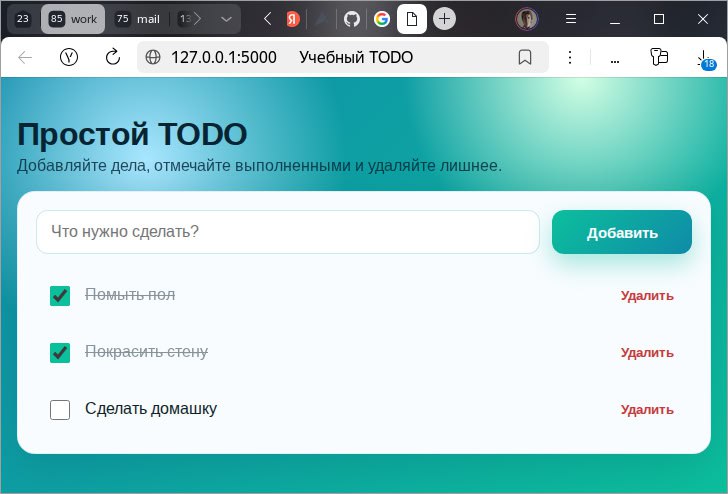
Create an app where I can manage a simple todo list. This is a learning project; I mainly want to understand how to write programs in Python, CSS, and HTML. Use Python for the backend, and HTML, CSS, and JS for the frontend. The app must let me enter a new task for the list, mark tasks as completed, and delete a task from the list. The user interface should include an input field, an add button, and a delete button. Each task in the list should be markable as done.
And basically, that is it. You can check the result in the github repo . A screenshot of the result is at the beginning of this post.